Digital student
Digital student
Before starting classes, we suggest you to get acquainted with the etiquette of distance learning
Single student’s account
What does it give access to?
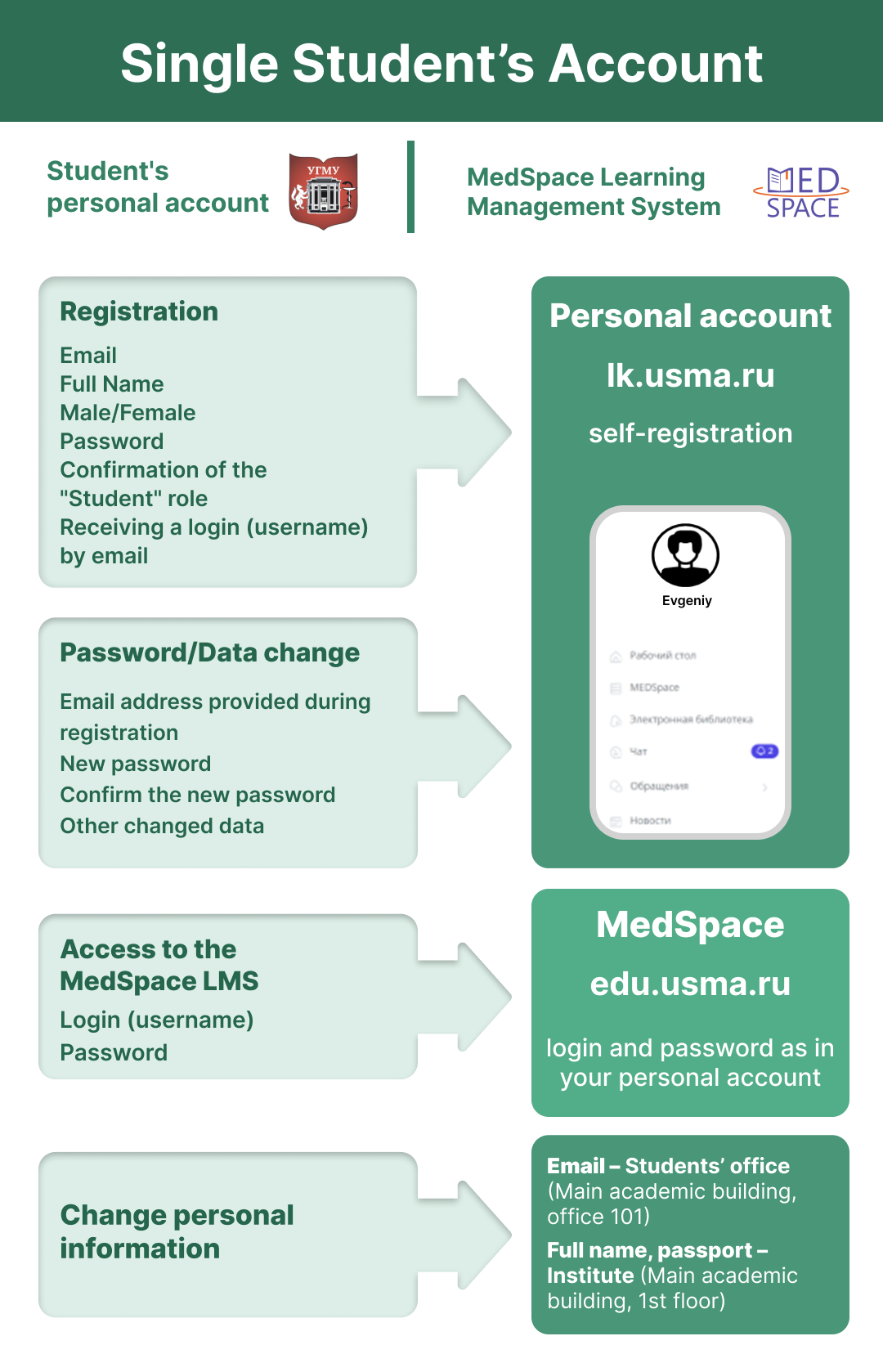
Student Personal Account
(lk.usma.ru)
(includes curriculum, grade book, academic performance, portfolio, etc.)MedSpace LMS
(edu.usma.ru)
(includes educational programs, learning materials, test, etc.)
How to get your single student’s account?
Registration is to be done once by you via your Student’s Personal Account
IMPORTANT: Use the same email address you provided during admission. If your email has changed, update it first (see the “My personal data has changed” section below).
After registreting in the Student’s Personal Account, wait for data synchronization with MedSpace (ussually it takes up to 10-15 minutes). Access to MedSpace will then be available with the same username(you will receive it to your e-mail) and password (you’ve made yourself).
Write down and remember your username and password!
They are the same for both systems
If something goes wrong?
I forgot my username and password
Recover your data in the Student’s Personal Account (lk.usma.ru) – use the “Restore password” button (online, no need to visit the university).
Your username will be sent to your email automatically. My personal data has changed
Email – can be changed at the Student Office
(Main Academic building, room 101)
Full name and pasport details – change at the Institute Directorate (Main Academic building, 1st floor)
I am trying to register again? but the system doesn’t let me in
Re-registering an account is not allowed. If you forgot your password or your personal data has changed? you need to update it(see above).
MedSpace
learning management system
Here you will find:
- Your educational program
- The disciplines you will study
- Lecture and reference materials for your courses
- Intermediate and final tests
- Clinical case studies
You can:
- Study materials at your own pace (witthin deadlines set by the teacher)
- Take tests interactively
- Submit assignments to your teacher
- Communicate via corse chat and forum
- Share your feedback on the course
Teacher can see your progress in the course.
Platforms for online classes and webinars
IVA360
The main platform of USMU for online lectures
When logging in, enter your full name and group
(no prior registration is required)
BigBlueButton
A web-conferencing system for organizing online learning.
The student accesses the video conference from the MedSpace LMS using username and password
Количество просмотров: 441